
The short version
Give every snag a number, an exact location, a short factual description and a photo with the defect clearly marked. Keep to one issue per item. Share it as a single PDF so everyone works from the same list.
What is a snag list?
A snag list is a record of defects and unfinished work that need putting right before a job is signed off. On a construction site it’s usually produced near practical completion or at handover. For a new home, it’s the buyer’s list of issues for the housebuilder. Either way, its job is the same: make each problem impossible to miss and easy to close off.
What every snag item needs
| Field | Why it matters | Example |
|---|---|---|
| Number | Lets everyone refer to the same item without re-describing it. | 7 |
| Location | The fixer has to find it. Be specific enough to walk straight to it. | Kitchen, sink run, left of the hob |
| Description | What is wrong, stated as a fact. Not a guess at the cause. | Chip in worktop edge, approx. 2 cm |
| Photo | Removes doubt. Mark the defect with a circle, arrow or pin. | Photo with pin 7 on the chip |
| Date raised | Useful for warranty periods and follow-ups. | 24/09/2026 |
| Status | Open, fixed or disputed, so the list can be closed out. | Open |
On larger jobs you may also record the trade responsible and a priority. Keep the core fields short and consistent so the list stays readable.
Good and bad snag descriptions
| Vague | Clear |
|---|---|
| Bathroom not finished | Sealant missing along back edge of bath |
| Door is wrong | Bedroom 2 door catches on frame at the top when closing |
| Paint bad in hall | Hall, wall above radiator: patchy paint, plaster visible |
| Skirting | Living room, right of window: 30 cm of skirting missing |
| Check window | Bedroom 1 window doesn’t lock; handle turns but catch doesn’t engage |
Notice the pattern: where, then what. Leave the fix to the person doing it unless there’s a specification to follow.
Take photos that point
An unmarked photo of a wall shows a wall. A marked-up photo shows the problem.
- Frame for context. Include a door, window or corner so the location is obvious.
- Mark the defect. Circle it or draw an arrow. In Drawpin, a numbered pin links the spot to its line on the snag list.
- Add a close-up when detail matters. A hairline crack or a chip may need a second, closer shot.
- Use good light. A torch held low across a wall shows up poor plaster and paint.
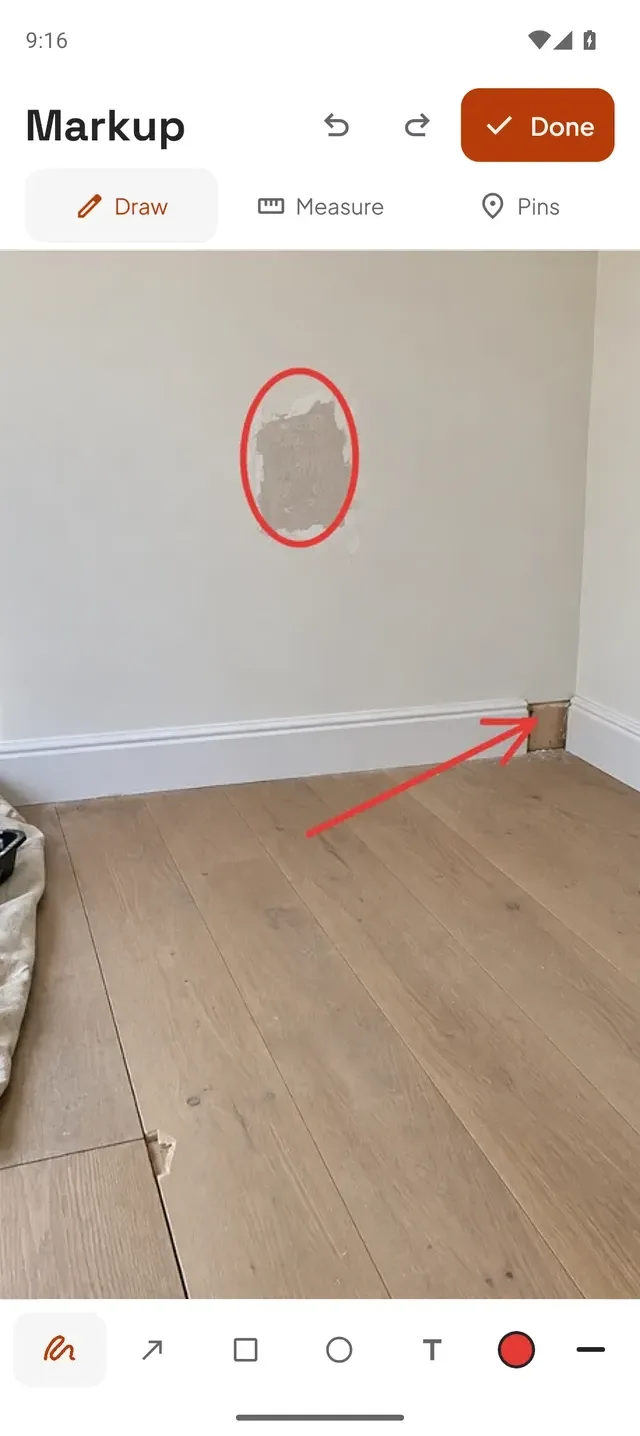
How to write a snag list, step by step
- Work in a fixed order. Go room by room or zone by zone, and in each space check ceiling, walls, openings, floor, then fittings. You’ll miss less. A snagging checklist helps.
- Record as you go. Photograph and note each snag on the spot. Writing it up later from memory is where detail gets lost.
- One issue per item. Two problems in one line means one of them gets forgotten.
- Number everything. “Item 12 is done” is quicker and clearer than a description.
- Review before sending. Remove duplicates, check each location makes sense to someone who wasn’t there.
- Share one document. Send a single PDF so everyone works from the same version.
Sharing the snag report
Whoever fixes the snags needs the photo and the note together. With Drawpin you can export a PDF that contains the marked-up photo and its numbered snag list, or share the marked-up image by itself. Send it through email, WhatsApp or Messages. The people you send it to don’t need an account or the app.

Snag list vs punch list
They’re the same thing under different names. “Snag list” is the usual term in the UK and Ireland; “punch list” is more common in North America. Both record the defects and unfinished work to close out before sign-off. See using Drawpin as a punch list app.