
What is a construction punch list?
A punch list records the defects and incomplete work that must be finished before a project is closed out. In the UK the same thing is usually called a snag list. Each item needs to say where the problem is and what’s wrong, so the right trade can put it right without a second visit to find it.
How Drawpin handles punch list items
- Capture. Take a photo on site or import one from your gallery.
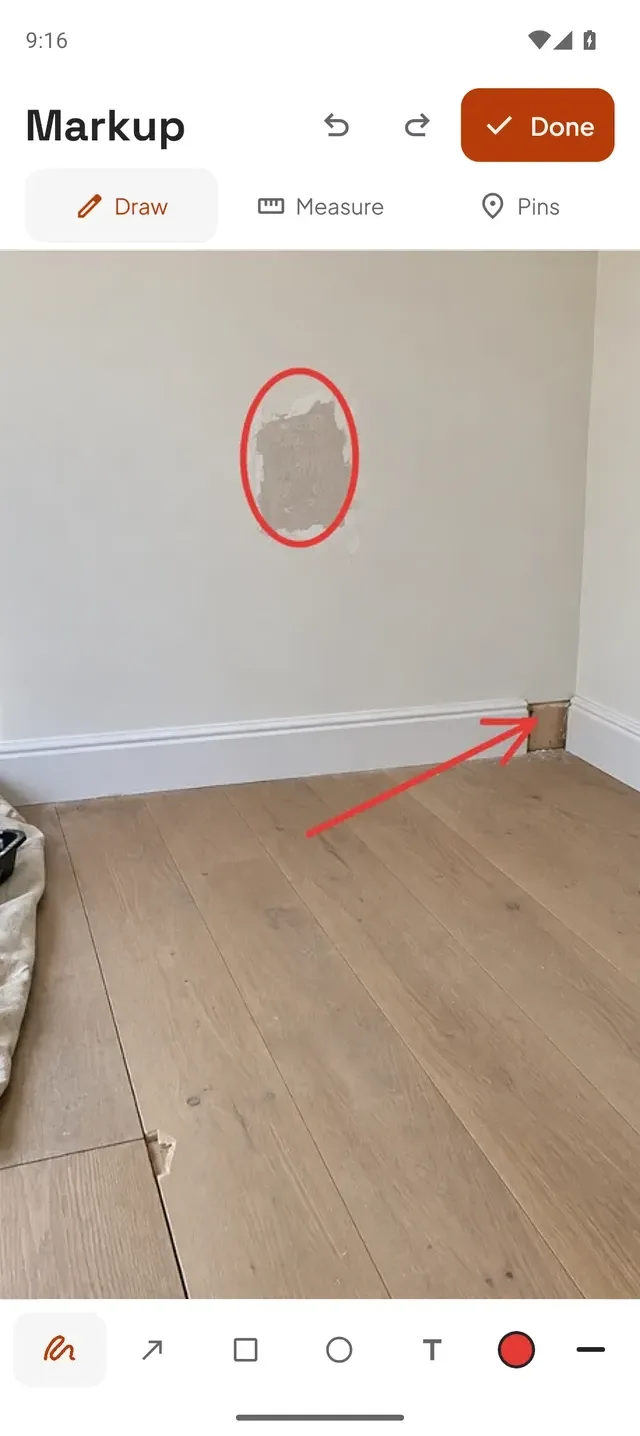
- Mark up. Circle, draw arrows and add text directly on the photo.
- Pin and describe. Drop numbered pins and write a short note for each item.
- Export. Create a PDF report with the marked-up photo and numbered list, or share the image.
- Share. Send it through email, WhatsApp or Messages. Recipients don’t need Drawpin.
Who uses Drawpin for punch lists
- Site supervisors and site managers walking a floor before handover.
- Handover and quality inspectors recording defects for the contractor.
- MEP and fit-out contractors flagging items for the next trade.
- Property and facilities managers logging repairs between tenancies.
Why a photo-first punch list works
Text-only punch lists rely on everyone reading a location description the same way. A marked-up photo removes the guesswork: the circle shows the defect, the pin number ties it to its line in the list. That means fewer return visits, fewer “which one?” calls and faster close-out.
- Offline first. Capture, draw and pin without a connection. Share when you’re back online.
- No accounts. Nobody has to sign up, including the people you send reports to.
- On your device. Photos and annotations stay on your phone until you choose to export them.
What Drawpin isn’t
Drawpin is deliberately simple. It isn’t a project management platform: there is no cloud project database, team login or task assignment. If your team already uses a system for tracking work, Drawpin produces the clear, marked-up photos and PDFs you can share into it.
Punch list app questions
Does Drawpin work without internet on site?
Yes. Taking photos, marking up, pinning and writing notes all work offline. You need a connection only when sending the report.
What format are punch list reports?
A PDF with the marked-up photo and numbered list, or the marked-up image on its own.
Which phones will it run on?
Drawpin is coming soon to the App Store and Google Play.