

In short
A snag is any defect or unfinished detail in a new home: a scuffed door, a gap in the sealant, a window that won’t lock. Your snag list tells your builder exactly what to fix and where. Drawpin turns each snag into a marked-up photo with a numbered note, so nothing gets lost in a long email.
What is new-build snagging?
Snagging is checking a newly built home for defects and recording them so the builder can put them right. Most snags are cosmetic: paint that has missed a patch, a cracked tile, a door that catches on the frame. Some matter more, like a leaking waste pipe, missing loft insulation or a window that doesn’t seal.
A good snag list is specific. “Bathroom needs finishing” is easy to argue with. “Sealant missing along the back edge of the bath, see pin 3” is not.
When should you snag a new build?
- Before completion, if your builder offers a pre-completion inspection. Snags found now can often be fixed before you move in.
- When you move in. Walk every room before the boxes arrive and hide things.
- Within the first two years. Under the most common UK new-home warranties, the builder is responsible for fixing defects during this period. Check your own warranty documents for the exact terms and deadlines.
How to snag your new home with Drawpin
- Go room by room. Start at the front door and work clockwise around each room: ceiling, walls, windows, floor, doors, then fixtures. Our room-by-room checklist tells you what to look for.
- Take a photo of each snag. Stand back far enough that the builder can tell which wall or fitting it is. Drawpin works offline, so a missing broadband connection on moving day doesn’t matter.
- Circle it, point to it. Draw around the defect or add an arrow so there’s no doubt about what you mean.
- Drop a numbered pin and describe it. Keep each note short and factual: what is wrong and where. One issue per pin.
- Export a PDF snag report. Choose “Save or Share” to create a PDF with the marked-up photo and the numbered snag list, or share the marked-up image on its own.
- Send it to your builder. Email the PDF to your builder’s customer care team, and keep a copy for your records.
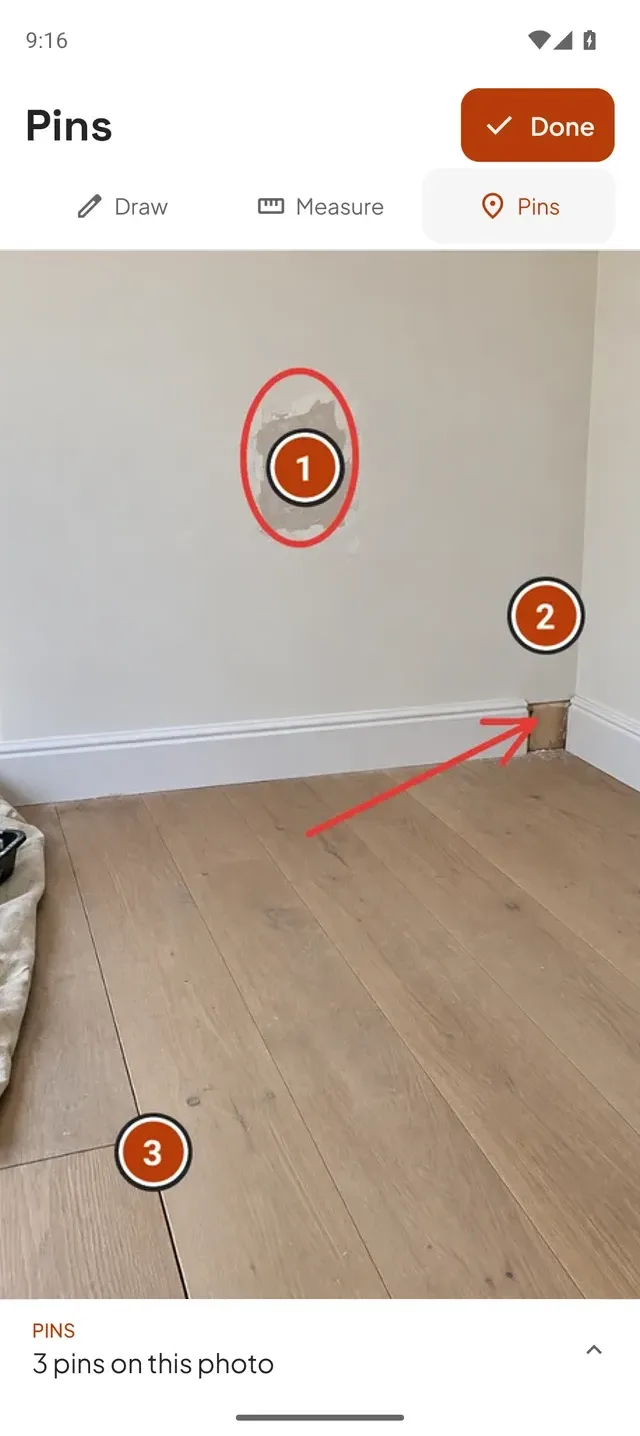
How to write snags your builder will act on
- Say where it is. Name the room and the position: “Bedroom 2, window on the left, bottom corner.”
- Say what is wrong, not how to fix it. “Chip in the worktop edge, 2 cm wide” rather than “replace worktop”.
- One snag, one pin. It makes it easy to confirm which items are fixed.
- Keep the tone neutral. A clear, factual report gets a faster response than a frustrated one.
- Re-check after repairs. Photograph the fixed item too, so you have a record that it was done.
More detail is in our guide on how to write a snag list.
Should you snag it yourself or hire an inspector?
Plenty of buyers snag their own homes, and a careful walk-round with a checklist will catch most visible defects. A professional snagging inspector brings experience and specialist tools, and is worth considering for a large home or if you aren’t confident judging building work. Either way, a clear photo record of each snag makes the conversation with your builder easier.
Questions about snagging a new build
Do I need internet to use Drawpin in my new home?
No. You can take photos, draw, pin and write notes without a connection. You’ll need a connection when you send the report by email or a messaging app.
Does my builder need the app to read the report?
No. Drawpin exports a standard PDF or image that anyone can open.
Do I need to create an account?
No. Open Drawpin and start snagging. Your photos and notes stay on your phone until you choose to share them.
Is Drawpin available on iPhone and Android?
Drawpin is coming soon to the App Store and Google Play.